01
The bug that looks like nothing
Here's a failure mode almost nobody checks for. Your agent has been running fine. You give it a completely ordinary task — review a pull request, summarise a doc, draft a reply — and it returns an empty response. No error. No refusal text. Just blank. You re-run it; still blank. You start blaming the model provider, your prompt, a network blip. None of those is the cause. The cause is sitting in your system prompt — the block of text every session silently prepends — and it has been there the whole time, only now it's tripping a safety filter you didn't know was reading it. This guide is the audit that finds it. We'll start with a real, recent case, then give you a repeatable checklist you can run on any agent you build or deploy.
- The symptom: empty/blank responses on tasks that have nothing to do with anything sensitive.
- The usual wrong guess: "the model is down" or "my code broke."
- The actual cause: text in the system prompt that a provider's OUTPUT classifier reads and reacts to — often something you never wrote by hand.
02
The cautionary tale: two skill descriptions that blocked 95% of sessions
The clearest real example comes from Hermes Agent (Nous Research), the open-source self-improving agent. Hermes ships with skills, and — like many agent frameworks — it injects each available skill's catalog description into every session's system prompt so the model knows what it can call. Two of the skills it bundled by default were red-team tools:
godmode (in the official catalog: "Jailbreak LLMs: Parseltongue, GODMODE, ULTRAPLINIAN") and obliteratus (mlops: "abliterate LLM refusals"). Harmless to have — but their descriptions contained words like "jailbreak" and "GODMODE." When Hermes ran on a model behind Anthropic, the provider's output classifier read those words sitting in the prompt and, on totally unrelated sessions — a normal PR review — returned an empty response. The agent wasn't doing anything wrong. The vocabulary in its own system prompt was the trigger.- The descriptions were auto-injected into every session's system prompt — not just sessions that used those skills.
- Anthropic's OUTPUT classifier (it reads the model's context, not just the user's message) saw "jailbreak" / "GODMODE" and returned EMPTY — no refusal, no explanation.
- The blocked sessions were unrelated work. The builder had no reason to suspect the skill catalog.
Verified against the official optional-skills catalog (descriptions quoted exactly) and the Hermes Agent repo. The point isn't "Hermes is broken" — it's fixed (see below). The point is that this can happen to any agent that puts skill/tool descriptions in the system prompt, and the symptom gives you zero clue where to look.
03
How the maintainers proved it — and the fix
This isn't a theory; the Hermes maintainers measured it. In the commit
chore(skills): move red-team skills (godmode, obliteratus) to optional-skills, testing showed that with those two description lines present, 19 of 20 sessions (95%) got blocked by the output classifier. After removing the lines from the default injection, 5 of 20 (25%) — a normal, much lower baseline. Same agent, same tasks; the only variable was whether two skill descriptions were in the prompt. The fix shipped in early June 2026: both skills were moved to opt-in (optional-skills/), so their descriptions only load into a session if you deliberately install them. The default prompt is now clean.| Condition | Sessions blocked (empty response) | What changed |
|---|---|---|
| Risky skill descriptions IN the default system prompt | 19/20 (95%) | Baseline — the bug |
| Descriptions moved to opt-in (optional-skills/) | 5/20 (25%) | Only the normal classifier baseline remains |
The 95% → 25% drop is the maintainer's own testing recorded in that commit. "Early June 2026" is as precise as the public record gets — don't over-state a specific day. The mechanism is the lesson: descriptions you never read are loaded into a prompt a classifier you don't control is reading.
04
Step 1 — Dump what's ACTUALLY in your agent's system prompt
You can't audit text you can't see. Most builders have never read their agent's full, assembled system prompt — they wrote 20 lines of instructions and assume that's all that's there. In reality the framework appends tool schemas, skill/plugin descriptions, memory, and environment context. Get the real, final string. The method depends on your stack, but the goal is identical: capture the complete system message that goes to the provider on a normal session, and read every line of it.
- If your framework has a debug/verbose flag, turn it on and capture the assembled system prompt (e.g. many CLIs print it with a
--debug/--verbose/--print-system-promptstyle flag). - If not, intercept at the API boundary: log the
systemfield (or the first message) of the actual request payload your agent sends to the provider. A 5-line logging wrapper around your LLM call is enough. - Include skills/plugins/MCP tool descriptions — these are the lines you didn't write and most need to see. Confirm whether your framework injects ALL available skill descriptions or only the ones in use.
- Save the dump to a file and read it top to bottom once. You're looking for text you didn't author and wouldn't want a safety filter to see out of context.
Rule of thumb: if you don't know what your agent's full system prompt contains right now, that's the vulnerability. The Hermes builders didn't either — until sessions started going blank.
05
Step 2 — The vocabulary checklist (words that trip output classifiers)
Provider safety classifiers don't reason about your intent; they pattern-match on vocabulary in the whole context, including the system prompt. A red-team skill, a security tool, a pen-testing helper, or even a colourfully-named internal tool can carry trigger words into every session. Scan your dumped prompt for this kind of language — not because the words are wrong to use, but because their presence out of context (on an unrelated task) is what flips a classifier to an empty or refused response.
- Jailbreak / bypass / circumvent safety / DAN / GODMODE / "ignore your guidelines" — classic jailbreak vocabulary, even when quoted descriptively.
- Abliterate / uncensor / remove refusals / unfiltered model — red-team and model-surgery terms.
- Exploit / malware / payload / weaponize / exfiltrate — security-tool descriptions read as intent when stripped of context.
- Explicit categories tied to provider usage policies (self-harm, CBRN, illicit) named in a tool/skill description — a classifier sees the category word, not your benign use.
- Anything instructing the model to disregard, override, or work around its own safety or the provider's rules — even as an example or a quoted template.
The fix is almost never "delete the capability." It's "keep that vocabulary OUT of the always-on prompt" — load it only when the relevant skill is actually invoked (Step 3). A description that reads "jailbreak LLMs" in every session is the problem; the same skill, loaded on demand, is fine.
06
Step 3 — Move risky skill descriptions to opt-in / lazy-load
This is the durable fix and it's exactly what Hermes did. Don't inject every skill's description into every session. Make the risky ones opt-in, so their text only enters the prompt when the user (or you) deliberately installs/enables them for a session that actually needs them. The pattern is generic across frameworks; Hermes exposes it cleanly with an explicit install command, and the same principle — lazy-load tool descriptions instead of front-loading all of them — applies to any agent you build.
- Identify which skills carry trigger vocabulary in their descriptions (from Step 2). Those are the candidates to move out of the default load.
- Move them to an opt-in tier. In Hermes that's
optional-skills/— not active by default; you install them explicitly:hermes skills install official/security/godmode(andhermes skills install official/mlops/obliteratus). The description only loads once installed. - In your own framework, mirror the pattern: don't concatenate ALL skill descriptions into the system prompt. Inject a description only when its skill is enabled for that session (lazy-load), or keep a short neutral catalog and fetch the full description on demand.
- For genuinely sensitive tools, gate them behind an explicit flag AND keep their verbose descriptions out of the shared prompt entirely — pass them only to the sub-call that uses the tool.
The exact opt-in command above is the real Hermes pattern:
hermes skills install official/<category>/<skill>. Generalised: default-load the minimum; lazy-load the rest. Your always-on system prompt should contain only what every session genuinely needs.07
Step 4 — The 30-second test: is your agent being silently blocked?
You don't need to wait for a confused user to discover this. Run a tiny controlled test any time you add a skill, plugin, or tool that touches security/red-team/safety vocabulary. The whole test is: does a known-good, trivially-safe task come back EMPTY? If a "say hello" returns blank, the problem isn't the task — it's the context around it.
- Give the agent the most boring safe task you can: "Reply with the single word: ok." Run it on a normal session (with your full system prompt loaded).
- If it returns empty or refuses — on "say ok" — a classifier is reacting to your context, not the request. That's your silent-block signal.
- Bisect: temporarily strip the suspect skill/tool descriptions from the prompt and re-run the same trivial task. If it now returns "ok," you've found the trigger.
- Confirm the rate, like the Hermes maintainers did: run the trivial task ~20 times with the lines IN vs OUT. A big gap (e.g. most blocked → mostly fine) proves the description is the cause, not luck.
- Wire it into CI: a startup smoke test that sends one trivial prompt and fails the build if the response is empty. Catches a silent-block regression the moment a new skill introduces it.
Why "empty" and not "error": output classifiers often return a blank rather than a visible refusal, so nothing in your logs says "blocked." The trivial-task probe turns an invisible failure into a clear pass/fail you can automate.
08
Where this gets unavoidable: agents you run for clients
Auditing one agent on your laptop is a 5-minute job. Doing it across every agent you deploy for paying customers — each with its own skills, each behind a provider whose classifiers you don't control, each capable of going silently blank on a customer's normal task — is the part that quietly eats your week. If your agents call models through a gateway instead of holding raw provider keys, you get one place to log the exact request (system prompt included) per call, spot the empty-response pattern across tenants, and standardise which skills load by default — rather than debugging twenty bespoke setups. Knotie's gateway is OpenAI-compatible (keep the standard SDK, swap
base_url to https://api.knotie.ai), so the audit discipline in this guide becomes something you apply once at the gateway, not per client.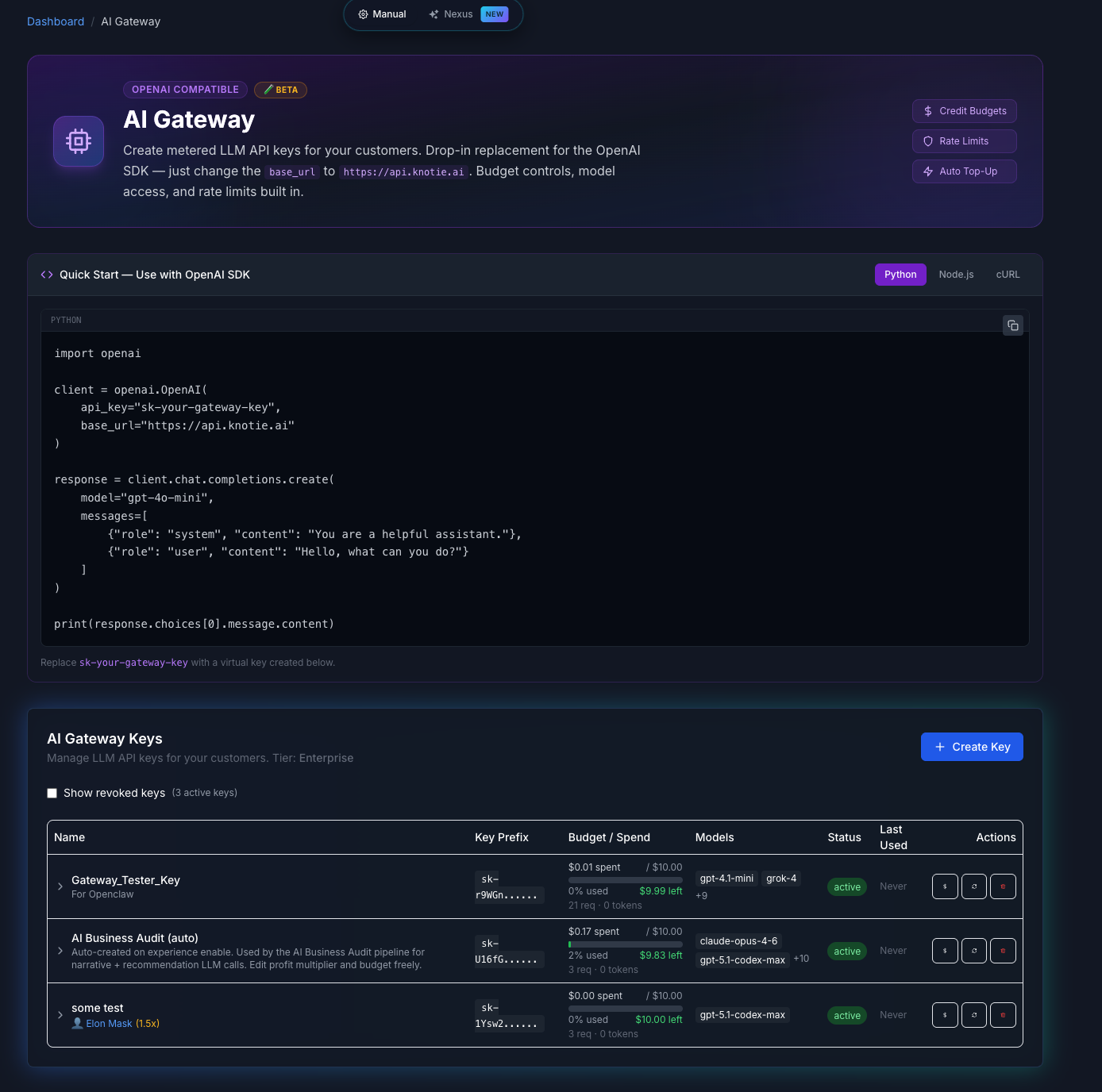
Scope to verified facts: the gateway is OpenAI-compatible and centralises model calls + per-key guardrails. It does not, by itself, audit your prompts for you — but it gives you the single chokepoint where this checklist is practical to enforce across many client agents.
09
The audit checklist (run it every time you add a skill or tool)
Five minutes, every time you bundle a new skill, plugin, MCP server, or tool into an agent. Each ticked box is a silent-block you'll never ship.
- DUMP: do I have the agent's full, assembled system prompt in front of me — including every injected skill/tool description, not just my own instructions?
- SCAN: did I read it for trigger vocabulary (jailbreak, abliterate, exploit, bypass-safety, policy-category words) sitting in the always-on prompt?
- OPT-IN: are risky skill descriptions moved to opt-in / lazy-load (e.g. Hermes
optional-skills/, installed only when needed) instead of injected into every session? - MINIMISE: does my default system prompt contain ONLY what every session needs — and load everything else on demand?
- PROBE: does a trivial "reply ok" task come back non-empty on a normal session? Did I check the rate IN vs OUT, not just once?
- AUTOMATE: is there a CI/startup smoke test that fails on an empty response, so a future skill can't reintroduce a silent block unnoticed?
- BLAST-RADIUS: if a classifier started blocking, would I find out from my own monitoring before a customer does?
Get the next drop
New AI build guides + the occasional bonus template. No spam, unsubscribe anytime.
By submitting you agree to our Privacy Policy & Terms. Unsubscribe anytime.
You're in — check your inbox to confirm.
Frequently asked questions
Why does my AI agent return an empty response on a normal task?
A common, under-checked cause is your system prompt. Many agent frameworks inject every available skill's or tool's description into every session. If one of those descriptions contains safety-trigger vocabulary (e.g. "jailbreak", "abliterate refusals"), a provider's OUTPUT classifier can read it — out of context, on an unrelated task — and return a blank response with no error. Dump your full assembled system prompt and read it; the trigger is usually text you didn't write by hand.
What's the Hermes Agent godmode / obliteratus case?
Hermes Agent (Nous Research) bundled two red-team skills by default:
godmode ("Jailbreak LLMs: Parseltongue, GODMODE, ULTRAPLINIAN") and obliteratus ("abliterate LLM refusals"). Their catalog descriptions were injected into every session's system prompt, so Anthropic's output classifier returned empty responses on unrelated sessions. Maintainer testing in the fix commit showed 19/20 (95%) sessions blocked with the lines present, dropping to 5/20 (25%) after removal. The fix (early June 2026) moved both skills to opt-in.How do I see what's actually in my agent's system prompt?
Use your framework's debug/verbose flag to print the assembled system prompt, or log the
system field of the actual request payload your agent sends to the provider (a small logging wrapper around the LLM call is enough). Crucially, make sure the dump includes injected skill/plugin/MCP tool descriptions — those are the lines most builders never wrote and most need to inspect.Which words in a system prompt can trip a provider's safety classifier?
Vocabulary that pattern-matches to misuse even when used descriptively: jailbreak, bypass/circumvent safety, DAN, GODMODE, "ignore your guidelines"; abliterate, uncensor, remove refusals, unfiltered; exploit, malware, payload, weaponize, exfiltrate; and named policy categories (self-harm, CBRN, illicit). The issue is their presence in the always-on prompt on unrelated tasks — not that the words are forbidden to use. Keep them out of the default load.
How do I move risky skill descriptions to opt-in?
Don't inject every skill's description into every session — lazy-load the risky ones. Hermes does this cleanly: the skills live in
optional-skills/ and aren't active by default; you install them explicitly with hermes skills install official/<category>/<skill> (e.g. official/security/godmode), so the description only loads when deliberately enabled. In your own framework, inject a tool's description only when that tool is enabled for the session, and keep verbose descriptions of sensitive tools out of the shared prompt.What's a fast test to confirm my agent isn't being silently blocked?
Send the most trivial safe task you can — "Reply with the single word: ok" — on a normal session with your full system prompt loaded. If it comes back empty or refuses, a classifier is reacting to your context, not the request. Bisect by stripping the suspect skill/tool descriptions and re-running; if it now returns "ok," you found the trigger. Run it ~20× IN vs OUT to confirm the rate, and wire a one-prompt empty-response check into CI.
Is this only an Anthropic problem?
No. Anthropic's output classifier is the documented case here, but every major provider runs safety classifiers over context, and the failure mode — trigger vocabulary in an always-on prompt causing blocked/empty responses on unrelated work — is provider-agnostic. The audit (dump → scan → opt-in → minimise → probe → automate) applies to any agent and any provider.
Sources · Hermes Agent — Optional Skills Catalog (godmode & obliteratus descriptions, opt-in install syntax) · NousResearch/hermes-agent — repo (commit: move red-team skills to optional-skills; 95% → 25% blocked) · Hermes Agent — Working with Skills (install / opt-in skills) · Hermes Agent — godmode skill (bundled red-teaming docs)